


記事はありません
お探しの記事は見つかりませんでした。
Copying of data from "external memory devices" such as SB memory, flash memory, floppy, MO, CD-R, DVD-R, and removable hard disk to a computer can be done as usual, but copying of data from the computer to "external memory devices" is prohibited.
Leaks of information can be prevented without reducing conveniences of external memory devices.
It does not restrict the use of USB port itself, so USB devices such as printer, keyboard, authentication device and mouse are usable as ever.
File copy with DOS command prompt can be prohibited.
In case of using [Save As...] in program's menu and specifying external memo ry devices (removable) as the destination to save, the action can be disabled.
In case of connecting USB memory via USB hub, copying can be prohibited.
Even with PC where data write to external memory devices is restricted, data can be written to a USB flash drive to which the administrator has given permission. Also in case an actual USB flash drive is not available to the administrator, the permission of exporting can be given remotely by transferring a configuration file.
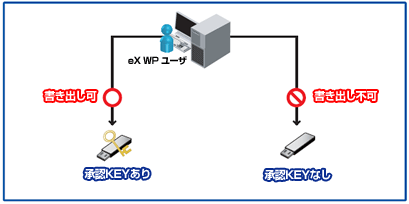
By restricting writable external devices to such USB flash drives as "SD-Container for eX WP" and "SD-Shelter for eX WP", which equip such security features as "password authentication" and "forced encryption of data", with the authenticating USB flash drives of eX WP, a good balance between usefulness and security can be achieved.
If the data copy to external memory devices is completely restricted, conveniences in business may be lost. To improve convenience while keeping a leakage risks to the minimum, a feature to allow temporary data write is available. The temporary unlocking feature can only be operated under the system administrator's permission, and cannot be executed by client PC users themselves.
*Windows98/Windows98SE/Windows NT Workstation 4.0 SP6 are not supported.
Uninstallation ID" is necessary to uninstall eX WP from client PC. This avoids arbitrary uninstallation by client users.