Support daily management jobs


2/14
Automatic re-execution according to result of task execution
* Continuous execution of tasks
You can configure for such a case as a continuous execution of tasks on clients.
For example, you can define conditions according to either results of the previous task, or client data, and give instructions only to the clients that satisfy the conditions to execute the following task.
* Re-execution by result of the previous exection
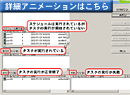
The status of tasks under performing on clients are classified in five types: "unexecuted", "scheduled tasks unexecuted", "in execution", "succeeded" and "failed". Then you can order to execute tasks again, by defining these status types as any conditions of execution.
Specify target machines with programs listing function
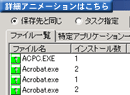
By selecting particular programs in the "Programs List", you can locate the client machines which the program is installed or is not installed.
At the same time, the version of the programs and the number of installed copies of the program is displayed.
Grouping of client machines and setting filters
* Grouping clients
By grouping the clients on which you would like to execute some tasks, you can configure to display only clients that have been added to the group or to set a common schedule to all the clients in a group.
Group settings can be saved, and displayed in directories like Explorer so that the management would be easier.
* Filtering clients
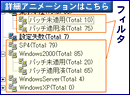
You can specify search conditions for clients based upon hardware/software data, user defined data, registory/INI file data, and so on, and save them as filters.
Filters can be cascaded by creating a filter under a group or under another filter.
2/14