[Q:1]
What should I do if conversion fails?
[A:1]
If conversion failed, please make sure to restore the backup data, then execute conversion again.
In case of failure, check the following procedure.
< Caution >
* If perchance converter is executed without restoring backup data after the failure of conversion, following things will happen :
1.) The console will quit when a task file is opened.
2.) Clients of QND Ver.8.7 SP2/QAW Ver.2.7 SP2 can't be executed.
* In case anything mentioned above happened, please follow these instructions :
1.) Copy these files from the backup data (data before the conversion).
- QNDPK: <QNDPlus folder>\bin
- QNDSK: <QNDPlus folder>
2.) Overwrite the following folder with the files copied by 1.).
- <QNDPlus folder>\Oldfiles\870\Key.1024\
* If data had not been backed up before conversion
- Delete "QNDSK" and "QNDPK" files in <QNDPlus folder>\Oldfiles\870\Key.1024\
(*) If these files are deleted, however, clients of QND Ver.8.7 SP2/QAW Ver.2.7 SP2 can't be executed anymore.
[Q:2]
I can't install "QP option and SU" against QND Ver.9.1 or QAW Ver.3.1 client. Why not?
[A:2]
In particular circumstances, there are cases that installation of "QP option and SU" is not possible.
Please check your operating environment, and take following workarounds if necessary.
* Environments where the issue occurs
| OS : |
Windows 2000Server(SP4)/Windows 2000 Professional(SP4)/Windows XP Professional(SP2) |
| Environment of QND operation : |
PULL executing (QP option, SU and RC option are not installed) |
(*) This issue does not occur in the following operational environment.
- QP option and SU have been installed by task operation
- Operation in Push executing environment
* Checking method
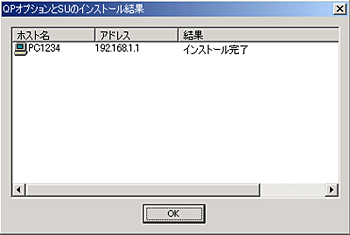
1. Execute "Host"-"Install QP option and SU" in the environment where the issue occurs.
2. "Installation completed" is displayed in the result of installation.
3. Check the version information of QP option and RC option.
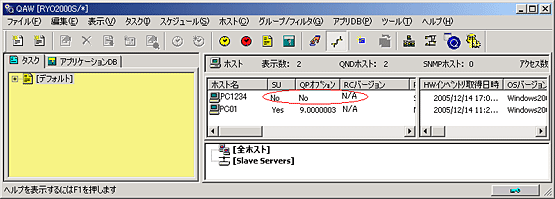
If that of SU is "No", that of QP option is "No" and that of RC option is still "N/A", the installation has failed.
* If successful, that od SU is "Yes", that of QP option is "9.0000003", that od RC option (in case it has been installed) is "9.0000003", and that of RC option (in case it has not been installed) is still "N/A".
* Workarounds
After the installation of "QP option and SU" failed, try installing "QP option and SU" again.
This issue should be evaded from the second time execution.
[Q:3]
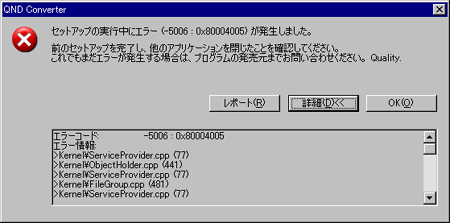
When I executed conversion, the message "Error(-5006:0x80004005) occurred while executing setup." is displayed. What should I deal with it?
Error message screen :
[A:3]
Execution of converter failed.
Coping strategy is described in the following manual(ActionMethod.pdf), so please read it to deal with.
* This issue occurs if the machine environment corresponds to all the following conditions.
- The OS version is either of the following: Windows 2000 Server (including SP)/Windows Server 2003 Standard Edition(including SP1)/Windows Server 2003 Enterprise Edition(including SP1)
- Terminal server is activated
- QND server program (QND Ver.8.7 SP2) has been installed
< Documentation >
* Workarounds for the issue of error that happens when QND data converter starts




 To Top