7/14
Scheduled execution of automatic installation
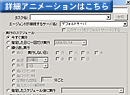
By installing a resident module (QP option) into clients, you can set automatic installation which can be scheduled to be done during a time zone with less load traffic of network. The timing of the task can be selected among these options: "Now", "Specified Date/Time", "Regularly", and "On login". The execution would never have clients be conscious of it, and force client machines to do the necessary tasks.
On even Windows NT clients where logon by admistrator rights is necessary for installation tasks, you can force the clients to execute installations by changing the owner of installation process to the administrator temporally with a feature of "
SwitchUser".
Switching to administrator account on NT machines (Switch User)
Even on Windows NT clients where login with administrator right is necessary for installation tasks, you can force installation tasks by changing the owner of installation process to the administrator temporally with the "
Switching to administrator account on NT machines (Switch User)" feature.
< SU for installing SU >
"When installing SU on the clients (with no "SU" installed), isn't an administrator right required after all?"
Until QND Ver.8.0, an administrator right is required to install SU, however from QND Ver.8.2, SU can be installed by "User" right with a QND task to which the account and password of the administrator have been passed through the settings of QND administrator information.
* This feature is only available on Windows 2000/XP. On Windows NT Workstation, an administrator right is required to install SU.
Automatic installation in WAN environment
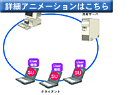
In automatic installation in a WAN environment, a slave server in the LAN acts as a master server.
The slave server receives a copy of installation program from the master server, and distributes it.
Software installation options
Installation programs are copied to local machines on executing automatic installation, and various options can be added then.
- Restart from checked points
In case the connection between QND server and QND agent is interrupted on transferring files because of troubles due to such causes as power shutdown on a client machine, failure on communication lines, memory shortage, and so on, the trensferring of the files can be restarted from the position where the interruption had occurred. The timing of the restart can also be chosen.
- Band Control Transfer
File transfer can be done with a limitation to the network band. It is effective if you would like to avoid the overload on the network.
Setting transfer speed and multicast transfer (the same data is sent to multiple clients) are also available.
- Pause processes before installation
You can pause processes running on clients before starting installation of a program.
This is useful if a running process should be killed before upgrading a program.
- QND Multicast
It is effective to transfer files within the same segment.
* Multicast can't be done to different segments. Please install
slave servers according to need.
7/14