Simple Quarantine feature


5/5
Simple Quarantine feature (Secure Policy Manager)
Secure Policy Manager(SPM) is a program that performs security policy check on clients and restricts use of client PC violating the policy, by liaison with QAW. It uses the policy configured by the administrator, and maintains secure client PC environment automatically.
- What's security policy?
It is possible to specify OS version, pattern file information of antivirus programs, state of installation of necessary programs, etc. as a policy that client PCs must be compliant with. A security policy all the clients must be compliant with can be created by mixing these items as the administrator like.
- Configurable security policy
By setting up a PC to which all the policies to be complied with have been applied, it can be used as a "referential PC". Using referential PC enables maintaining the policy conditions to the latest ones. Also each policy item is configurable individually.
| Item |
Description |
| OS Info - Version |
Version of OS |
| OS Info- Build Number |
Build number of OS |
| OS Info - Service Pack |
Service pack of OS |
| OS Info - HotFix |
HotFix of OS |
| IE Info - Version |
Version of IE |
| IE Info - HotFix |
HotFix of IE |
| Antivirus Program Name |
Name of antivirus program |
| Version of engine file of antivirus program |
Version of engine file of antivirus program |
| Antivirus Resident Flag |
Allow or disallow residence of antivirus program |
| Installed Applications |
Applications registered in "Add/Remove Applications" |
- Confirming PCs that have failed in policy check
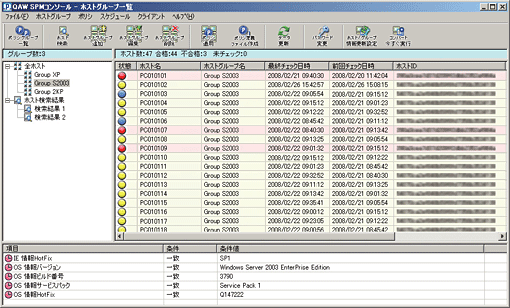
It is possible to check low security level PCs that have failed in policy check more times than the rated value defined by the administrator, through the administrator console. PCs that have failed more times than the rated value are displayed in red, PCs that have failed but still less times than the value are displayed in yellow, and PCs that passed the check are displayed in blue.
- Blocking policy violating PC from the network
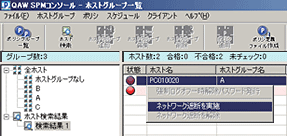
It is possible for the administrator to block hosts that have failed in the policy check more times than the rated value and been repeatedly violating rules from the network manually through SPM Console.
- Restrict using policy violating client PC
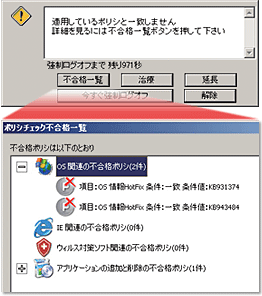
If the policy applied does not match the system configuration of a client PC, it will fail in the policy check and an alert is posted.It is possible to check which policy the PC configuration did not match in the list of failure. If the administrator defined a remedial procedure, it is possible to refer to it by clicking "Remedy" button.
If these PCs are not treated, it is possible to restrict their use by forcing them to log off from OS.*It is also possible to block them from the network without forcing them to log off, or do it manually.
- Providing remedy for policy violation
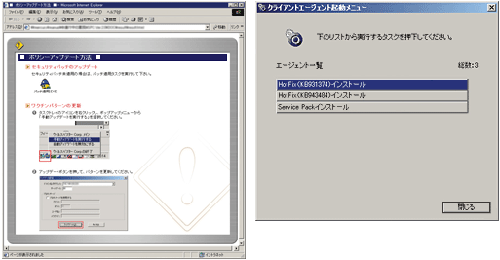
These two remedial procedures are available: "display HTML for remedy" function and "use the menu for launching agent" function.